

Posted by L’équipe Ameublement à rabais
on October 13, 2026

Table of Contents
- Why choosing an office chair matters for your back
- Lumbar support and office chair support: what to check
- Office chair adjustment: the five essential settings
- Ergonomic sitting position to relieve back pain
- Office chair suited for long working hours
- Adapting your choice to your body type and your space
- Trying and adjusting your chair before and after purchase
- Frequently Asked Questions
Last update: October 13, 2026
Why choosing an office chair matters for your back
Back pain is one of the most common complaints among workers who spend hours sitting every day. A poor office chair makes this pain worse, while a suitable seat can really make a difference.

The problem is not just sitting. It is sitting correctly, for long periods, without increasing tension in your lower back. An poorly chosen office chair forces your spine into positions that put pressure on your discs and muscles.
A good chair supports the natural curvature of your back. It keeps your hips, knees, and feet in the correct alignment. It allows for adjustments to adapt to your unique body type. That is where the real solution lies.
Lumbar support and office chair support: what to check
Lumbar support is the key point when looking at how to choose an office chair for back pain. The lumbar region is your lower back. This is where most people feel pain after sitting for a long time.
Good lumbar support does not mean a soft cushion placed at random. It means a support that follows the natural curve of your lower back and can be adjusted for your body type. Without this support, your lower back rounds backward. This position compresses the discs and tires the muscles.
Location and depth of lumbar support
The support must be positioned exactly where your lower back needs it. Not too high, not too low. For most people, this is between 10 and 15 centimeters above the seat.
The depth of the support also matters. Support that is too flat does nothing. Support that is too protruding creates uncomfortable pressure. The best balance offers firm support that truly follows the curve of your lower back without digging into it.
The ergonomic mesh office chair with 4D lumbar support from Ameublement à rabais offers depth adjustment up to 4 centimeters. This allows you to adapt the lumbar support to your exact shape, whether it is more or less pronounced.

Adjustability of lumbar support
Fixed lumbar support does not suit everyone. Your body type is unique. Your pain may also vary depending on your position or the time of day.
Look for a chair where you can adjust the lumbar support up or down. Ideally, you can also adjust it forward or backward to find the exact spot that relieves your pain.
Office chair adjustment: the five essential settings
How to choose an office chair for back pain also depends on your ability to adjust it correctly. An ergonomic chair only works if you can adapt it to your body.
Here are the five settings that really matter:
- Seat height
- Seat depth
- Backrest tilt
- Adjustable armrests
- Rocking mechanism
Seat height and knee alignment
Seat height determines the angle of your knees and hips. If the seat is too high, your feet do not touch the floor. If the seat is too low, your knees rise too high.
The right height allows your feet to rest flat on the floor with your knees at about 90 degrees. Your thighs should be parallel to the floor or slightly inclined downward.
Look for a chair with adjustable seat height. This ensures that you can find the perfect position for your height and your desk.
Seat depth and hip position
Seat depth is the distance between the backrest and the front edge of the seat. A seat that is too deep forces your hips backward and creates pressure on the back of your thighs. A seat that is too short does not support your thighs correctly.
The right depth allows you to lean against the backrest while having about 10 centimeters of space between the front of the seat and the back of your knees.
Check the seat dimensions before buying. Most office chairs have a depth between 45 and 50 centimeters.
Backrest tilt and rocking mechanism
Backrest tilt changes the angle at which you lean. A vertical backrest is suitable for certain tasks. A backrest slightly tilted backward often relieves pressure on the lower back.
A good rocking mechanism allows the backrest and the seat to move together. This maintains your ergonomic posture even when you lean backward. Avoid chairs where only the backrest tilts. This changes your alignment and can create pressure.
Look for a rocking mechanism that offers multiple tilt positions. This allows you to find the angle that relieves your back pain.
Adjustable armrests and elbow position
Adjustable armrests keep your arms and shoulders in the correct position. If the armrests are too low, your shoulders slump. If the armrests are too high, your shoulders rise toward your ears.
The right height places your elbows at about 90 degrees, with your forearms parallel to the floor or slightly inclined upward. Your shoulders should be relaxed, not tense.
Look for height-adjustable armrests. Some chairs also offer forward-backward adjustment, which helps adapt the position to your desk.
Ergonomic sitting position to relieve back pain
A good sitting position makes all the difference in reducing back pain. Even the best chair only works if you sit correctly.
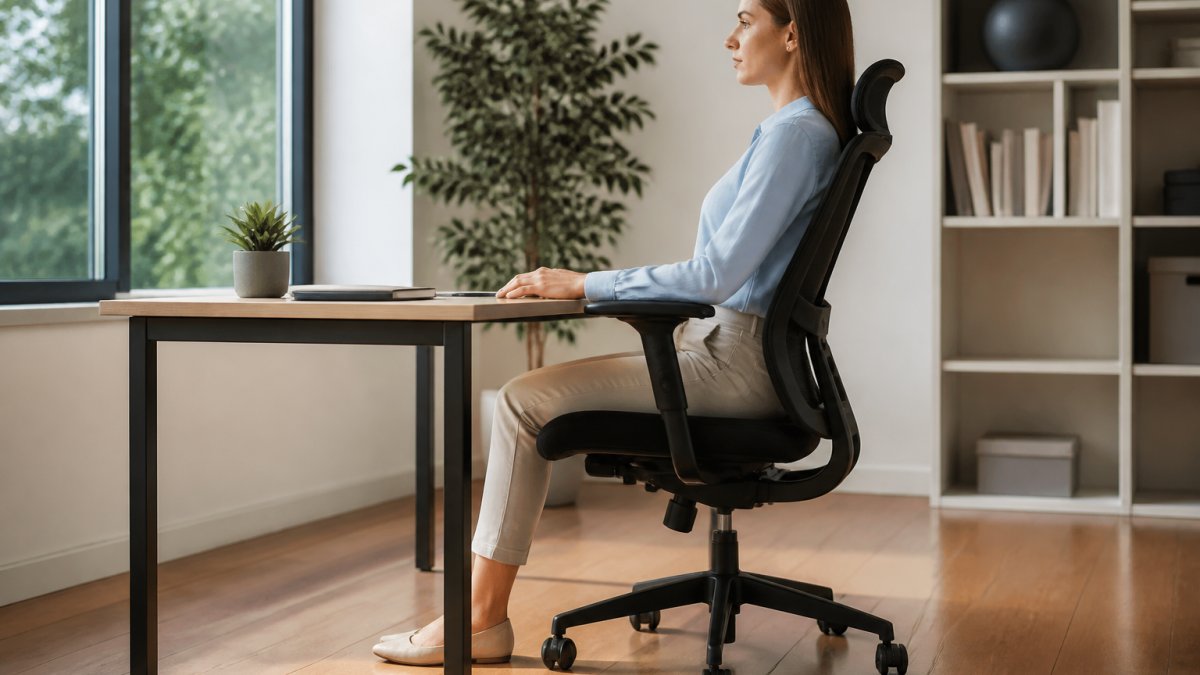
Back alignment and natural curvature
Your spine has a natural curvature. The lower back (lumbar region) has an inward curve. The middle back has an outward curve. Your neck has an inward curve.
A good sitting position maintains these natural curves. The chair's lumbar support follows the inward curve of the lower back. The backrest supports the middle back without forcing it forward.
When you sit, imagine a straight line running through the top of your head, your shoulders, your hips, and your knees. This line should be almost vertical.
Ergonomic mesh office chair with 4D lumbar support, black →
Shoulder, neck, and head posture
Many people who have lower back pain also create tension in the neck and shoulders. This often happens because the chair position forces poor upper-body posture.
Your shoulders should be relaxed, not hiked up toward your ears. Your neck should be straight, not leaned forward or backward. Your head should be balanced over your shoulders.
When your chair properly supports your lower back and your armrests are at the right height, the rest naturally follows. You can sit in a position that relieves tension everywhere.
Office chair suited for long working hours
If you work for several hours at a time, chair comfort becomes even more important. After a few hours, even minor discomfort becomes significant pain.
Breathable materials and comfortable seat
Breathable materials allow air to circulate between your body and the seat. This prevents heat and moisture buildup, which makes sitting uncomfortable after a long time.
Mesh is an excellent choice for long hours. It breathes well and offers good support. A high-density foam seat cushion absorbs your weight without sagging.
Ameublement à rabais offers several office chairs with breathable mesh and high-density foam.
Mobility and alternatives to a static position
Sitting in the same position all day creates increasing pressure on your back. Even with the best chair, you need to move.
A good chair allows you to change positions easily. A smooth 360-degree rotation helps you reach different areas of your desk without twisting. A rocking mechanism allows you to lean back to relax.
Also look for opportunities to get up and move. Even a few minutes of movement every hour helps reduce pressure on your back. An ergonomic chair makes you more comfortable when you are sitting, but movement remains essential.
Adapting your choice to your body type and your space
Two different people may need different chairs. Your height, weight, and body proportions affect which chair is best for you.
Height, weight, and body proportions
A chair that suits a person who is 160 centimeters tall may not suit someone who is 185 centimeters tall. The proportions of arms, legs, and torso also vary.
Check the chair dimensions and weight capacity recommendations before buying. The recommended seat height varies by height. The seat depth must match the length of your thighs.
Many office chairs offer a wide adjustment range. This helps accommodate different heights. If you are very tall or very short, look for a chair specifically designed for your body type.
Compatibility with your desk and environment
The chair must work with your desk and your space. A chair that is too wide will not fit under a small desk. A chair with wide armrests can collide with the desk when you lean forward.
Measure your workspace before buying. Check the chair dimensions, especially the width and depth. Ensure that the armrests do not interfere with your movement.
Also think about your floor. A chair with PU casters works well on floors. If you have thick carpet, check that the casters can move easily.
Trying and adjusting your chair before and after purchase
Buying a chair online means you cannot try it before buying. This creates some uncertainty.
Before buying, read other customers' reviews. Look for specific comments on comfort and lumbar support.
Also check the exact dimensions and adjustment capabilities. Compare them with your desk and your body type.
After purchase, take the time to adjust the chair correctly. Start with the seat height. Then adjust the lumbar support.
Give yourself a week or two to adapt to the new chair.
Ameublement à rabais offers several ergonomic office chairs at accessible prices.
Choosing the right office chair for back pain requires attention to detail.
Frequently Asked Questions
How do I properly adjust my office chair for back pain?
Start by adjusting the seat height so that your knees form a 90-degree angle and your feet rest flat. Then, adjust the lumbar support so that it contours to the natural curve of your lower back. Check that your armrests support your forearms without straining your shoulders, and tilt the backrest slightly to reduce pressure on your spinal discs. These personalized adjustments are essential for maintaining a healthy posture and reducing fatigue.
What type of office chair lumbar support should I choose?
Look for lumbar support that is adjustable in height and depth so it can adapt to your body type. An adjustable 4D or 2D lumbar support allows you to customize lower back support according to your needs. The support should be positioned between 10 and 15 cm above the seat to effectively support the lumbar region and reduce pain.
Should I move regularly even with an ergonomic chair?
Yes. An ergonomic chair reduces fatigue and improves back support, but sitting in the same position for hours can lead to discomfort. Get up and move every 30 to 60 minutes, do light stretches, and change your sitting position. Alternating between sitting and mobility is essential to maintain your back's comfort in the long term.
How do I know if an office chair suits my body type?
Check that the seat depth allows your thighs to rest completely without the edge of the seat pressing against the back of your knees. The seat height should allow your feet to touch the floor with your knees at 90 degrees. If you are taller or shorter than average, look for a chair with extended height and depth settings for a personalized fit.
