

Posted by L’équipe Ameublement à rabais
on October 07, 2026

Table of Contents
- What is a reclining office chair and why should you adopt one
- Benefits of reclining for health and well-being at work
-
Essential features of an ergonomic office chair
- The tilt mechanism: synchro, asynchro, or simple tension
- Lumbar support: integrated, adjustable, or absent
- Tilt angle: what the degrees actually mean
- Padding: high-density foam, pocket springs, or molded foam
- Armrests: adjustable, flip-up, or fixed
- Rotation and the base
- The gas lift: the part everyone forgets to check
- Summary table
- Adjusting a desk chair's tilt: a practical guide
- Ideal office chair height based on your body type
- Comparison of available reclining models
- Conclusion: choosing the right chair for your workspace
- Frequently Asked Questions
Last update: October 7, 2026
What is a reclining office chair and why should you adopt one
A reclining office chair allows you to switch from an upright seated position to a relaxed one without leaving your seat, transforming your workspace into a multifunctional zone where you can work, read, or relax. This mobility helps home workers, students, and remote professionals maintain comfort and focus.

Key Point
Reclining is not a luxury; it is an ergonomic strategy recognized for reducing fatigue and improving well-being at work.
Benefits of reclining for health and well-being at work
Staying frozen in one position for hours creates muscle tension and limits circulation. When the backrest reclines, your weight is redistributed: pressure on the discs decreases, back muscles relax, and your legs find a natural position, which prevents fatigue from building up.
Ergonomics experts emphasize that incorporating adjustable armrests enhances arm and shoulder comfort during long sessions, contributing to the prevention of musculoskeletal disorders.
Pro Tip
Taking 2-3 minute reclining breaks every hour, simply by leaning the backrest back, visibly reduces cervical and lumbar tension by the end of the day.
Essential features of an ergonomic office chair
What distinguishes a good reclining chair is rarely the fabric or color: it is the mechanics under the seat and the quality of the components.
The tilt mechanism: synchro, asynchro, or simple tension
This is the most defining feature for long-term comfort, and the least well-explained in product descriptions.
- Simple tension tilt: Only the backrest tilts. Affordable, but the thighs lose support and pressure builds up behind the knees.
- Synchro-tilt: The backrest and seat tilt together at a fixed ratio (often 2:1 or 3:1), which keeps the thighs supported. This is the most recommended mechanism for sessions longer than two hours.
- Asynchro-tilt: Angles are adjusted independently. More flexible, but more complex to calibrate and usually reserved for high-end models.
If you are choosing between two chairs at the same price, the synchro-tilt mechanism is almost always the better choice for prolonged daily use.
Lumbar support: integrated, adjustable, or absent
Lumbar support maintains the natural curve of the lower back and reduces tension on the spine. There are three configurations:
- Structural: The shape of the backrest follows the lumbar curve. Effective, but not adjustable.
- Dedicated cushion: A bulge or cushion integrated into the lumbar area. More pronounced, sometimes too much so for shorter users.
- Height and depth adjustable: The most versatile configuration, but also the rarest in affordable ranges.
Tilt angle: what the degrees actually mean
The maximum tilt angle is often highlighted, but it should be viewed with nuance:
- 90-100°: Upright working position. Suitable for typing and tasks that require precision.
- 100-110°: Relaxed working position. Most ergonomists consider this range ideal for long sessions.
- 110-135°: Reading, calls, viewing screens. A headrest becomes useful beyond 120°.
A 155° chair is not necessarily "better" than a 135° model: it simply covers a wider range. For classic office use, 135° is more than sufficient.

Padding: high-density foam, pocket springs, or molded foam
Padding makes the difference between immediate comfort and lasting comfort.
- Molded foam: Dense and durable, it keeps its shape. Firmer at first, but more stable.
- High-density foam: A good compromise between comfort and longevity. This is the standard for mid-range chairs.
- Pocket springs: Add localized support and a more "enveloping" feel. Common on ergonomic models, rarer on reclining chairs with footrests.
A thick seat is not automatically better: foam that is too thick and too soft will sag faster and create pressure points.
Armrests: adjustable, flip-up, or fixed
Adjustable or flip-up armrests adapt the chair to different working positions. Flip-up models are practical for small desks, as they can be tucked away to bring the chair closer to the workspace.
Rotation and the base
360° rotation and smooth casters are essential for mobility, and a five-prong base ensures stability. Two types of casters exist:
- Hard casters: For carpets and rugs.
- Soft casters (rubber): For hardwood, laminate, and hard surfaces, as they cause less scratching.
The gas lift: the part everyone forgets to check
The gas lift controls the seat height. Gas lifts are classified from 1 to 4, with class 4 being the most robust. For daily use, aim for at least class 3.
Summary table
| Feature | Importance | What to check |
|---|---|---|
| Tilt mechanism | Critical | Synchro preferred for long sessions |
| Lumbar support | Critical | Adjustable ideal, otherwise well-positioned |
| Tilt angle | High | 135° is sufficient for most uses |
| Padding | High | Molded or high-density foam; pocket springs a bonus |
| Armrests | Medium | Adjustable or flip-up depending on space |
| 360° Rotation | High | Essential for mobility |
| Casters | Medium | Soft for hard surfaces, hard for carpets |
| Gas lift | Critical | Class 3 minimum, class 4 for heavy use |
Key Point
The tilt mechanism and gas lift are the two components that most determine long-term satisfaction, and they are the ones least described in product spec sheets. Check them before comparing colors or fabrics.
Adjusting a desk chair's tilt: a practical guide
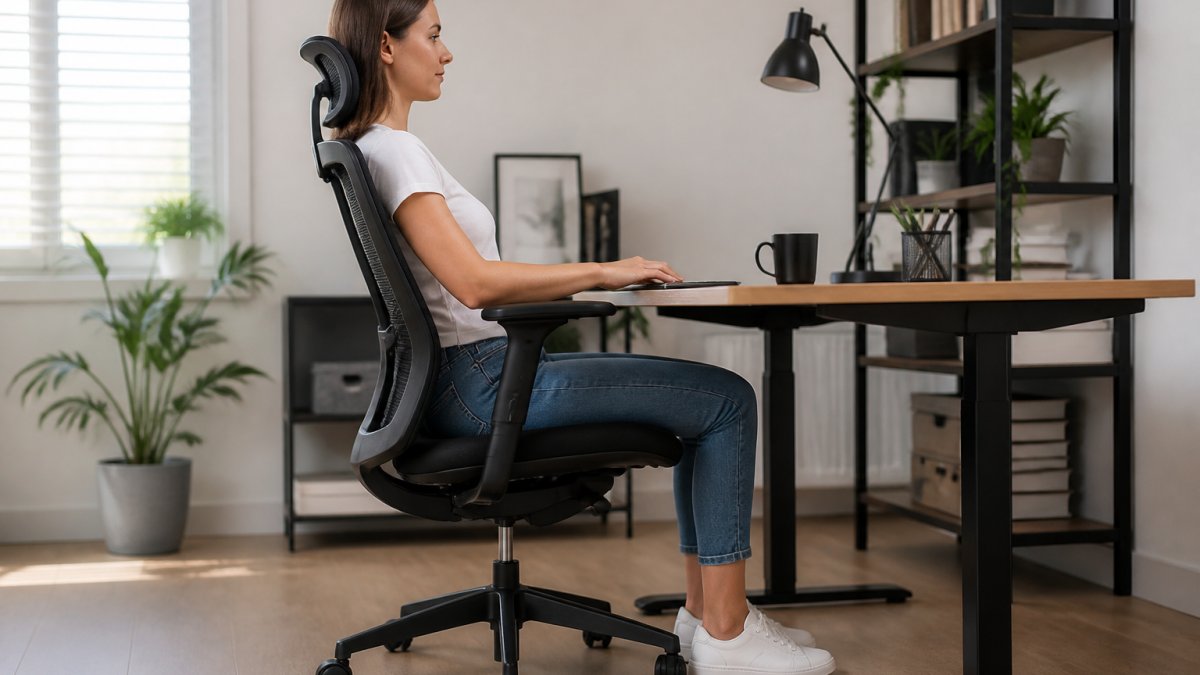
Most guides simply say "adjust the tension." In practice, the right setting depends on your weight, height, and the type of mechanism.
Step 1: Identify your tilt mechanism
First, identify the type of mechanism under the seat:
- Free-float tilt: The backrest follows body movement without adjustable resistance. Simple, but poorly suited for long work sessions.
- Adjustable tension tilt: A knob or dial under the seat adjusts resistance. This is the most common mechanism on retail reclining chairs.
- Synchro-tilt: The backrest and seat tilt together at a fixed ratio (often 2:1 or 3:1), which keeps the thighs supported and reduces pressure behind the knees. The most comfortable mechanism for long periods, but also the rarest in affordable ranges.
The asynchro-tilt allows for separate adjustment of the backrest and seat angle, especially on high-end chairs.
Step 2: Adjust tension according to your weight
Tilt tension should be adjusted according to your weight, not your height.
- Under 130 lbs: Start with the lowest tension, then increase one notch at a time until the backrest stays in place when you lean slightly forward without pushing with your feet.
- 130 to 200 lbs: start at the middle position. Adjust upward if the backrest "falls" when you release, and downward if you have to push hard with your back to recline it.
- Over 200 lbs: start with maximum tension and reduce gradually. A backrest that gives way too easily under heavy weight creates an unpleasant "dropping" sensation and can surprise the user.
The simple test: sit down, relax your back muscles, and let the backrest do the work. If it supports you without pushing you forward or letting you fall backward, the tension is correct.
155° Ergonomic Reclining Office Chair with Footrest and Seat →
Step 3: calibrate the angle to your height
A comfortable tilt angle depends on your torso length and the height of the backrest relative to your shoulders.
- Short torso (often under 5'6"): a backrest that ends below the neck can create pressure at the base of the skull when you recline. Choose a backrest that extends slightly above your shoulders and limit your working tilt to 10-15°.
- Medium torso (5'6" to 6'): a 15-25° range works well for reading and calls. Beyond 30°, a headrest becomes useful to prevent the head from tilting backward.
- Long torso (over 6'): aim for a backrest that is at least 26 to 28 inches high. Without this, reclining transfers pressure to the upper back instead of distributing it along the spine.
Step 4: adjust lumbar support in the reclined position
Lumbar support that is well-placed in an upright position can become uncomfortable when reclined, as the pelvis moves back and the lumbar curve changes. Two options:
- If the lumbar cushion is height-adjustable, move it up by about an inch when switching to a prolonged reclined position.
- If the support is fixed, add a small cushion or a rolled towel behind your lower back to fill the gap that is created.
Step 5: test the position for 10 minutes, not 10 seconds
A position that is comfortable for 30 seconds can become uncomfortable after 10 minutes. Sit down, recline, and stay there for the duration of a call or reading. If you are constantly straightening back up, the angle or tension is poorly adjusted.
Pro Tip
Adjust the tilt tension before adjusting the height. Improperly calibrated tension distorts your perception of your seated position and will lead you to adjust the height in the wrong direction.
Attention
Failing to adjust the tilt tension correctly is a common mistake. A backrest that tilts too easily can cause a sudden fall, while excessive tension tires out back muscles when you try to recline. Take the time to test each notch before setting your final adjustment.
What other guides don't tell you
Immediate comfort is not a good indicator: too little tension seems pleasant for five minutes, then the backrest becomes unstable. The right setting requires a light, constant effort to tilt the backrest, and keeps it in place as soon as you release.
Ideal office chair height for your body type
The height of the seat determines the alignment of the entire body. Incorrect height creates a cascade of postural problems.
For users of average stature (5'6" to 6'): a seat height between 20 and 23 inches works well.
Spinal alignment starts with seat height.
An in-depth comparative analysis reviewed computer chair models by incorporating consumer reviews to establish quality recommendations.
Comparison of available reclining models
Ameublement à rabais offers several models to meet different needs and budgets. Here is what sets them apart.
155° Reclining Office Chair with Footrest and Padded Seat, Grey: This model offers maximum recline, ideal for stretching out during breaks.
Ergonomic Office Chair with Footrest, Flip-up Armrests, and 135° Reclining Backrest, Grey: This model moves up-market with pocket springs, a 5.9-inch thick seat, and integrated lumbar support.
Ideal For
Work-from-home employees who spend entire days sitting and who appreciate dedicated lumbar support.
Large Ergonomic Office Chair with Footrest and 135° Reclining Backrest, Black: This model is designed for taller users: wide seat (23.2 inches), high backrest (29.1 inches), and integrated headrest for complete support. The 396-pound capacity makes it a choice for larger users. At $229.99, it is a reasonable investment.
| Model | Recline | Capacity | Adjustable Height | Lumbar Support | Price |
|---|---|---|---|---|---|
| 155° Grey | 155° | 264 lbs | 20.1-23.2 in | Structural | $224.99 |
| 155° Black | 155° | 264 lbs | 20.1-23.2 in | Structural | $228.99 |
| 155° Light Grey | 155° | 264 lbs | 20.1-23.2 in | Structural | $215.99 |
| 135° Grey | 135° | 396 lbs | 21.7-25.6 in | Dedicated cushion | $219.99 |
| 135° Large | 135° | 396 lbs | 18.9-22 in | Cushion + headrest | $229.99 |
Conclusion: choosing the right chair for your workspace
Choosing a reclining office chair depends on your body type, work habits, and budget. The models from Ameublement à rabais cover this range. For most users, the 155° reclining office chair with footrest in light grey offers the best value for money. For reinforced lumbar support, the 135° grey model adds pocket springs and a thicker seat.

Frequently Asked Questions
Which reclining office chair is the most comfortable?
Comfort depends on your body type and your needs. Models with pocket springs, high-density foam, and adjustable lumbar support generally offer better long-term support. Check that the seat and backrest are thick (at least 5 inches), that the backrest reclines to at least 135°, and that the armrests are adjustable to adapt the chair to your posture.
What is the purpose of the tilt function on an office chair?
The tilt allows you to lean the backrest backward to alternate between an active working position and a relaxed position. This reduces pressure on the spine during breaks, improves blood circulation, and prevents muscle fatigue during long work sessions. A synchronous tilt mechanism, where the seat and backrest tilt together, offers better lumbar support.
How should you adjust the tilt of an office chair for optimal comfort?
Start with a 10 to 15° tilt while working to maintain an active posture. Use the tilt tension to control the resistance: too little tension allows for involuntary tilting, while too much tension tires the back. During breaks, increase the tilt to 120-135° to relax your muscles. Test gradually until you find the balance that suits you, as every body type reacts differently to adjustments.
What height of chair is suitable for a desk?
The ideal seat height depends on your height and that of your desk. In general, your feet should rest flat on the floor or a footrest, your knees should be at 90°, and your elbows should be at the same level as the desk surface. Reclining models generally offer adjustable seat heights between 50 and 65 cm. Measure the distance from your knee to the floor while seated to determine the ideal range before buying.
Is a reclining office chair suitable for prolonged use?
Yes, provided you choose a model with good ergonomic support. For prolonged use, prioritize models with pocket springs, high-density foam, and integrated headrests. Alternate between sitting and reclined positions to avoid muscle fatigue and back pain.
Investing in a quality reclining office chair is an investment in your daily well-being. Back pain, fatigue, and chronic tension are often the result of poor posture over long periods. Ameublement à rabais offers ergonomic models designed to reduce these issues while remaining affordable. Explore the complete selection and find the chair that will transform your workspace into a more comfortable and productive environment.
